
Small business owners, take note:
SEO is a marketing strategy that can greatly enhance your organic search metrics, boost sales, establish you as an authority in your industry, and - the best part is - it's entirely free to do.
You’ve probably heard the term “keyword research” time and time again. But what does that phrase really mea?
How do you pick good keywords? How can you do it without spending big on expensive SEO tools? And how can you get started without spending all dang weekend writing blog posts as long as California?!
In this guide, we’ll cover why keywords matter, what makes a “good” keyword, and give you a step-by-step process using free tools to discover, evaluate and prioritize keywords for your website.
By the end of this guide, you’ll have a clear system you can put into action ASAP.
CONTENTS
WHY DOES SEO MATTER FOR MY BUSINESS?
Before diving into the “how” of it all, it’s important to understand why SEO (search engine optimization) is so important, especially for small business.
After all, why should you invest any time in choosing keywords if they aren't going to provide some sort of ROI?
So in case you aren't aware of why SEO is so important, here it is:
SEO keywords are the bridge between what your target audience is searching for and the solution you provide.
This means that if you leave your business to the whims of disorganized writing for the sake of "personality" or "winging it," you're missing out on valuable opportunities to properly educate search engines on what exactly it is that you do or provide so that when consumers go searching for it, they find you in a snap.
If you pick keywords no one uses, or you pick ones you can’t realistically rank for, you’ll sink to the far back page depths of search engines, having wasted time and effort to see absolutely nothing in return.
Here are some of the key benefits of SEO marketing:
-
Increased visibility. When your site ranks higher for relevant search queries, more people will find you. For example, ranking on page 1 of Google means far more clicks than being buried on page 8. (Skillfloor)
-
Cost-effective long-term marketing. Unlike paid advertising where you pay per click, organic traffic from good SEO provides a “free” stream of visitors (after your effort). (semrush.com)
-
Better user experience and trust. SEO isn't just about stuffing keywords; it forces you to improve your website’s structure, speed, mobile-friendliness and content. That helps users and builds credibility. (Metric Marketing)
-
Higher conversion potential. Visitors that find your site by searching for something very specific (i.e., "socks for poodles") are often further along in the buying/inquiry cycle, meaning better chances of becoming customers. (Skillfloor)
-
Competitive advantage. If your competitors aren’t doing keyword research (or doing it poorly), you can seize the opportunity to outrank them and capture more traffic. (Telstra.com)
In a nutshell: choosing the right keywords is one of the most foundational parts of any SEO strategy and can greatly impact your bottom line. Without this step done well, even perfectly built websites may struggle to get traffic or leads.
WHAT MAKES A GREAT SEO KEYWORD?
Not all keywords are created equal.
For meaningful results, you’ll want to prioritize keywords that align with your business goals, have realistic potential, and make sense for your audience.
Here are the key criteria we look for in a great SEO keyword:
-
Relevance – The keyword should match what your target audience is actually searching for and what you can deliver. If you build indoor doghouses for small dogs, then choosing a keyword like “outdoor doghouses” probably isn’t your focus, no matter how good the search volume metrics may be...
-
Search volume – This is the number of monthly searches for that term (in your target region/language). If the volume is zero or very low, there’s little traffic potential. However, very high volume keywords are often extremely competitive since businesses throw ad money at securing those keywords. The sweet spot is medium-high search volume with low competition...
-
Competition / difficulty – How hard will it be to rank for that keyword? Big generic keywords (e.g., “pet sitting”) might have huge search volume, but are likely dominated by huge agencies or older sites. For smaller businesses you'll need to target “long-tail” keywords (longer, more specific phrases) where the competition is lower (e.g., "pet sitting for Alaskan snowbirds").
-
Search intent – What is the user looking for when they type that keyword? Are they looking for information, offer comparison, to buy, or to contact someone? If someone types “how to design a birdhouse”, they may be in the learning phase—if they type “birdhouse designer in Denver CO”, they may be ready to hire.
-
Business value – Will ranking for this keyword likely lead to leads, enquiries or sales? A keyword that attracts lots of visits but none convert is less useful than one with fewer visitors but higher conversion potential.
-
Trend / seasonality – Some keywords fluctuate based on time of year or trends. Using free tools you can check whether a keyword is stable or trending upward (or downward).
OUR STEP-BY-STEP PROCESS FOR SEO KEYWORD RESEARCH
Now that you've got the gist of why SEO is so important, why SEO keyword selection is even more important, and what you need to know to track down those juicy keywords, let's get down to business.
Below is our general SEO keyword research process.
Now, because we're pros, we've got a variety of sneaky tips and tricks that we use due to having access to high-cost SEO search tools.
BUT, have no fear. Because before we got all fancy with that arsenal, we grew our SEO chops from using the free tools we'll have listed at the bottom of this post.
Be aware: SEO research is time consuming. It's a trial and error process. Sometimes a keyword works like a dream, and sometimes it flops with no discernible changes. That's SEO for ya. Keep at it, keep experimenting, and soon enough you'll be a pro at SEOing your entire business.
STEP 1: BRAINSTORM SEED KEYWORDS
Start with a list of 5-10 “seed” keywords (basic terms relevant to your business or service).
For example, if you're a fitness trainer for busy CEO's, seed keywords might include: “CEO fitness trainer”, “virtual fitness trainer for high-performing executives”, “personal training for executives”, etc.
This brainstorming is best done by thinking like your ideal client: what would they type into Google if they were looking for you?
STEP 2: EXPAND & GENERATE KEYWORD IDEAS
Using your seed keywords, you can now generate a broader list of keyword ideas (including long-tail phrases).
Here are some free tools you can use:
-
Google Keyword Planner – Free via a Google Ads account. It gives keyword ideas, search volume ranges and filters by location/language. (techtarget.com)
-
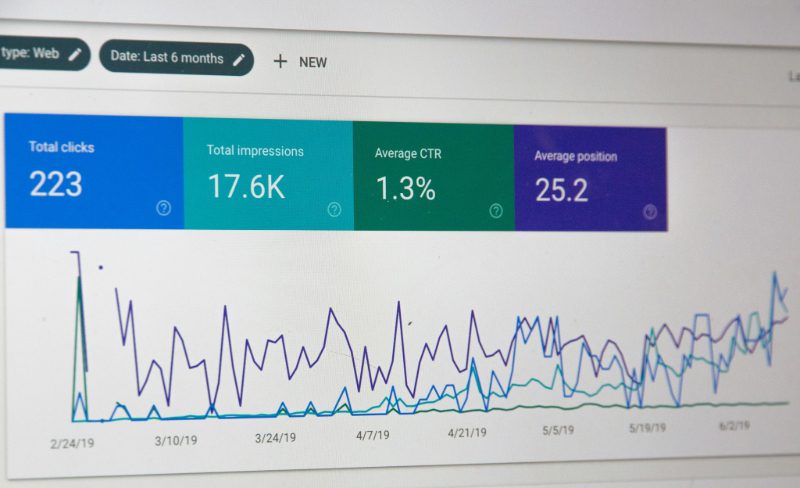
Google Search Console – If your website is already online, this gives data on the keywords you’re currently ranking for, impressions, clicks and average position. Useful for uncovering existing keyword opportunities. (techtarget.com)
-
Keyword Surfer – A free Chrome extension that shows search volumes and related keywords directly in the Google results page. (techtarget.com)
-
Seobility Keyword Research Tool – Free version offers keyword suggestions, search volume, competition estimates and SERP analysis. (Seobility)
-
Free keyword lists and idea tools (see “15 Free Keyword Research Tools” list) – e.g., AnswerThePublic, Soovle, Ubersuggest (free version) – for idea generation. (Search Engine Journal)
Using these tools: plug your seed keywords in, see what related phrases come up, and start to export or list them off in your research notes.
Look for variations with modifiers (e.g., “best”, “affordable”, “for small business”, “in [city]”), question-form keywords (“how to…”, “what is…”), and location-specific keywords if relevant.
STEP 3: MEASURE & FILTER YOUR KEYWORDS
Now that you've got a list of keyword ideas, you need to filter and prioritize them using the criteria we set out earlier: relevance, volume, competition, intent, business value.
Here’s a simple worksheet you can create (in a spreadsheet) and fill in for each keyword:
| Keyword | Estimated Monthly Searches | Competition/Difficulty | Search Intent | Business Value | Notes |
|---|---|---|---|---|---|
| e.g., “horse trainer denver” | 320 | Medium | Hire a horse trainer in denver | High – local lead | Long-tail + local |
WHAT TO LOOK FOR/JUDGE IN A KEYWORD:
-
Use the tools above to get search volume (or a volume range). If volume is extremely low (say <50 searches/month in your region) you might deprioritize.
-
Check competition/difficulty. Some tools will give an estimated score; if you don’t have the score, you can do a quick manual check: Google the keyword and see how strong the top results are (big brands, long-established sites). If it’s dominated by huge sites, ranking will be harder.
-
Assess the search intent. When you search the term yourself, do the results show informational content (“how to…”) or service pages (“hire a horse trainer…”)? If your goal is to get leads, keywords with “service intent” tend to convert better.
-
Assess the business value. Will being found for this keyword help you get the right kind of traffic? For example, “dog beds for dentist office” might be very relevant if you target dentists who want a dog bed in their office; “can dentists office have dog beds in the waiting room” might have volume but less direct lead potential.
-
Look for long-tail and geolocation. If you’re targeting a local area or niche, adding modifiers like city, “affordable”, “small business”, “for [industry]” often yields more specific (lower volume) but higher-intent keywords.
-
Trend/seasonality. Use tools like Google Trends to check if the keyword’s interest is stable or dropping. For example, “holiday dog bed sales” might spike December-January.
-
Prioritize a mix. You may want a few “medium-volume/medium-difficulty” keywords that are highly relevant, plus some “low-volume/low-competition” keywords that you can realistically rank for early.
STEP 4: ANALYZE YOUR CURRENT RANKINGS (IF ANY) & THAT OF YOUR COMPETITORS
You’re not working in a vacuum. It helps to know where you currently stand and what your competitors are doing.
Using these free tools, check to see the competitive market you're in and where you and everyone else stands:
-
Google Search Console. See which queries your site already appears for, which pages get impressions/clicks, and where you might improve.
-
Seobility/other free tools. Analyze competitor domains (some free tools allow this) to see what keywords they rank for, what pages bring them traffic.
-
Plug your keyword into Google and review the results. What type of pages show up (service pages, blogs, directories, big brands)? This gives you a sense of how hard it will be to compete and what kind of content you might need.
STEP 5: CHOOSE YOUR FIRST ROUND OF TARGET KEYWORDS
From your filtered list, pick out (for starters) maybe 3-5 primary target keywords and 5-10 secondary/long-tail keywords. For example:
-
Primary: “custom dog beds in [City]”
-
Secondary: “affordable dog beds for small dogs”, “indoor dog beds for executives”, “custom dog beds in denver”, etc.
Your primary keywords will be used for your main service pages (home page, service page) and your secondaries can be used for blog posts, FAQ pages, local pages, etc.
STEP 6: MAP KEYWORDS TO YOUR EXISTING WEBSITE CONTENT PAGES
Don't just go into it willy nilly: make a plan for which page on your website will target which keyword(s).
A good practice to follow for placing keywords is this:
-
Service pages get primaries. Make sure title tags, H1s, meta descriptions, page copy reflect the keyword naturally.
-
Blog/Resource pages get secondaries and long-tails. For example a blog post titled “How to custom dog bed designer in Denver CO” might target one of your secondary keywords.
-
Location pages get location modifiers. If you serve specific geographies or regions, then your location based target keywords should go on location oriented pages, like contact page.
-
FAQ or ‘industry’ pages get niche modifiers. Targeted niche modifiers like “truck decals for professional plumbers” or “custom dog beds for local businesses” should be reserved for FAQ or industry specific pages.
STEP 7: MONITOR & ADJUST ACCORDINGLY
Once you publish content and optimize your pages, pay attention to how traffic on your website (specifically on those adjusted pages) adapts.
Get Google Analytics loaded onto you site and start paying attention to where your traffic is coming from, how much traffic you receive, and how long they stay on the pages in question.
Conduct assessments by doing the following:
-
Use Google Search Console to track whether impressions/clicks are increasing for your target keywords.
-
Use the free tools again periodically to check if volume or competition has changed.
-
Monitor your rank positions (some free tools give limited tracking) and check whether the traffic you’re getting is converting into enquiries or leads.
-
If a keyword isn’t performing or is too competitive, consider pivoting to a more specific long-tail version.
FREE TOOLS TO GET YOU STARTED WITH SEO KEYWORD RESEARCH
Listed throughout this post are a variety of free tools to get you started on your SEO keyword research journey. For quick reference, we've listed them below for you: